Tag: AI Tools for Legal

  • California May Turn AI Guidance for Lawyers Into Formal Conduct Rules

    California May Turn AI Guidance for Lawyers Into Formal Conduct Rules

    California's State Bar is doing more than repeating familiar AI guidance for lawyers.

    It has proposed amendments to the Rules of Professional Conduct that show what lawyer-AI obligations can look like when a major bar starts moving from guidance into rule text.

    That is the part worth watching.

    The archived public-comment materials show a proposal developed after the California Supreme Court asked the State Bar to consider how its 2023 generative-AI guidance, and newer agentic-AI issues, might be incorporated into the Rules of Professional Conduct. The public comment period listed on the archived page has already closed. The bigger point remains: the proposal gives one of the clearest official previews of how AI obligations for lawyers may harden into enforceable discipline rules.

    The Short Answer

    • California has not adopted binding AI conduct rules for lawyers yet.
    • The State Bar's proposal still matters because it shows how AI issues may be written into core professional-duty rules instead of left in advisory guidance.
    • The proposal's focus areas are the ones lawyers should expect everywhere: competence, confidentiality, client communication, candor, supervision, and verification of AI-generated legal authority.

    Why This Matters Beyond California

    Most lawyer-AI guidance so far has followed a familiar pattern.

    Bars, courts, and ethics bodies issue practical reminders: understand the tool, protect confidentiality, verify citations, supervise staff, and tell clients enough about material AI use.

    That guidance matters. It still leaves room for firms to treat AI governance as a policy issue rather than a disciplinary issue.

    The California proposal is different because it points toward actual rule text.

    Once AI expectations are folded into professional-conduct rules, the discussion changes. The question is no longer only whether a lawyer followed emerging practice guidance. It becomes whether the lawyer violated a binding duty that can support discipline, disqualification fights, client disputes, malpractice claims, or sanctions arguments.

    That is why this proposal deserves attention outside California too.

    What The Proposal Covers

    The State Bar materials describe proposed amendments tied to core lawyer duties affected by artificial intelligence.

    The tracked proposal topics include:

    • competence,
    • confidentiality,
    • client communication,
    • candor,
    • supervision, and
    • verification of AI-generated legal authority.

    That list matters because it avoids the mistake of treating AI as one standalone issue.

    Instead, it treats AI as something that cuts across the duties lawyers already owe.

    The practical message is plain. A lawyer does not get a separate, lower standard because a problem came from an AI tool instead of an associate, vendor, paralegal, or research database.

    The Verification Point Is The Sharpest One

    The most concrete signal in the proposal is the emphasis on verification of AI-generated legal authority.

    That fits the wider court pattern Clearon has been tracking. Judges are not only reacting to imaginary cases anymore. They are reacting to false quotations, misdescribed holdings, unsupported propositions, and filings that reached the docket without real source checking.

    California's proposal matters because it shows how that concern could migrate from scattered sanctions opinions into an express professional-conduct framework.

    For firms and lawyers, the lesson is direct: citation verification is becoming part of AI governance, and AI governance is moving toward core ethics obligations.

    Confidentiality And Client Communication Are Next

    The proposal also matters because it recognizes that AI risk for lawyers is not only about bad citations.

    Confidentiality questions turn on what tool is used, what data goes into it, what contractual or technical protections exist, and whether the workflow changes the privilege or work-product analysis. Client-communication questions turn on whether AI use is material to the representation, whether a client should be told, and whether the lawyer can accurately explain the benefits and limits of the system being used.

    Those are not abstract issues anymore. They already appear in litigation, discovery disputes, and protective-order fights.

    The California proposal suggests that bars may start treating those decisions less as optional internal policy choices and more as components of ordinary professional responsibility.

    Supervision Does Not Stop At The Tool

    Another reason this proposal matters is supervision.

    AI use in legal practice often sits in the middle of a chain:

    • a vendor builds the tool,
    • a firm or department approves it,
    • staff or junior lawyers use it,
    • and a signing lawyer adopts the output.

    The supervision question is where responsibility lands when that chain breaks.

    Courts have already answered part of it. The signing lawyer remains responsible for the filing or work product that reaches the client or tribunal.

    The California proposal appears to push in the same direction. AI does not dissolve supervisory responsibility. It raises the need for it.

    This Is Still A Proposal

    The proposal should not be overstated.

    The archived State Bar page reflects proposed amendments for public comment, not adopted California Supreme Court rules. The comment deadline listed on the page has already passed. As of this article's publication, the tracked issue is the proposal itself and what it signals, not a final adopted rules package.

    That distinction matters. Lawyers should not describe these provisions as current binding California ethics rules unless and until they are formally adopted.

    Still, the proposal is important because it shows the direction of travel. It is a preview of how one major bar is thinking about turning AI guidance into enforceable conduct rules.

    What Lawyers Should Do Now

    Lawyers and firms do not need to wait for final California action to act on the proposal's logic.

    They should already be able to answer:

    • which AI tools are approved for legal work;
    • what information may or may not be entered into them;
    • who verifies citations, quotations, legal propositions, and record references;
    • when client disclosure about AI use is required or recommended;
    • how AI-assisted work by staff and contract lawyers is supervised;
    • how incident escalation works when an AI-generated error is found; and
    • what records show that these controls were actually followed.

    If the firm cannot answer those questions clearly, it is not ready for a world where bar regulators start reading AI use through standard professional-duty rules.

    Bottom Line

    California's State Bar has not adopted binding AI rules for lawyers yet. It has done something close to the next most important thing: it has shown what those rules may look like.

    The proposal treats AI as a competence, confidentiality, client-communication, candor, supervision, and verification problem. That is a more serious frame than generic reminders to be careful with AI.

    For lawyers, the message is simple. The safest assumption is that AI governance is moving toward ordinary professional responsibility, not away from it.

    Sources

  • Didn’t Want a Better AI Chatbot. Wanted a Working AI System.

    Didn’t Want a Better AI Chatbot. Wanted a Working AI System.

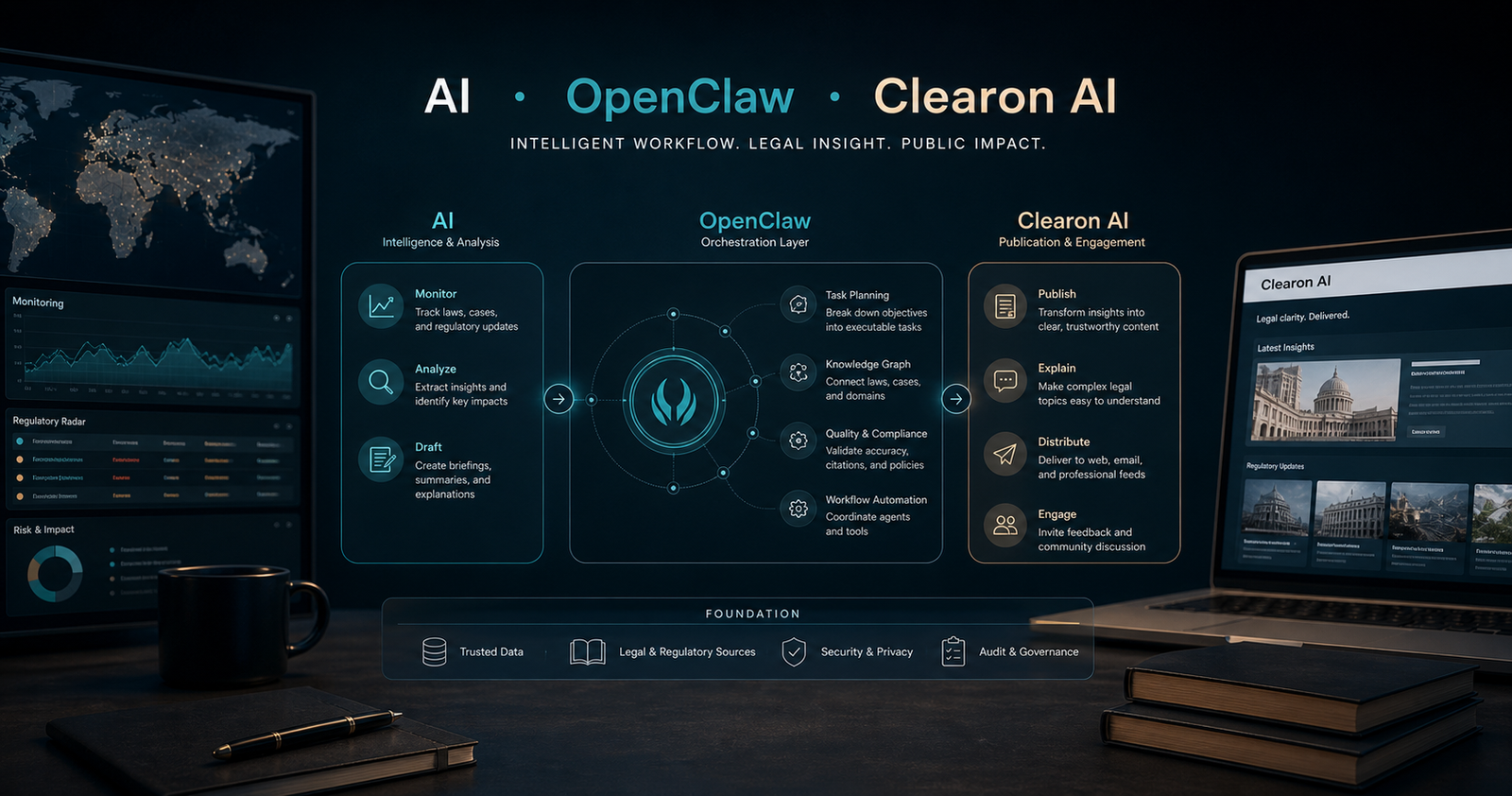
    Most people experimenting with AI are still using it like a search engine with better grammar. I wanted to know whether it could do something more: monitor, organize, draft, publish, and improve over time without me babysitting every step.

    I am also a bit of a geek about AI, so part of this was pure curiosity. But part of it was a real professional question: could an independent AI agent system actually be useful for legal and regulatory work?

    That question led me to OpenClaw, a separate Mac Mini, a backup drive, and eventually a public website. Here is what I learned.

    The First Question I Asked

    Before building anything, I asked multiple AI agents the same question: what should I actually do with a system like this?

    The answers were surprisingly consistent. Given my legal background, every agent pointed toward the same use case: monitor AI laws, regulations, litigation, court rules, and governance developments in a structured way.

    That made immediate sense. AI legal and regulatory developments move fast, but not cleanly. A proposed bill is not a final rule. A regulator's speech is not binding law. A lawsuit is not a finding. A court order can be quietly significant long before anyone notices. That's exactly the kind of landscape where disciplined monitoring, source-checking, and follow-through matter, and where an AI agent, set up well, could genuinely help.

    What started as a regulatory tracker quickly evolved. The system could identify patterns, surface article ideas, and support publishing, not just logging. The experiment stopped being a tracking exercise and started becoming an analysis and publishing workflow.

    Why I Bought a Separate Mac Mini

    Once I decided to take the experiment seriously, I did not want it living on the same machine as everything else in my life. So I bought a higher-end Mac Mini and dedicated it to this project.

    I added an external drive for Time Machine backups and put the setup on a UPS so a power outage would not erase work in progress. The goal was to be able to experiment freely without feeling like one broken install was one step away from disaster.

    I also wanted my personal information to stay personal and the experiment to stay contained. That separation mattered more than I expected. It made everything feel more intentional, and honestly, a lot easier to manage.

    (Yes, I turned "let's try an AI agent" into a separate machine, a backup drive, and battery protection. That is also just who I am.)

    Finding OpenClaw

    As I explored different agent setups, OpenClaw stood out because it felt closer to a real operating environment than a demo. I was not looking for a flashy interface. I was looking for something that could connect tools, hold working context, manage drafts, communicate through Slack, and support repeatable workflows, not just one-off prompt tricks.

    One early detail that helped: ChatGPT could walk me through the OpenClaw install step by step. That made the setup feel approachable rather than daunting. I got the system running faster than expected, and that early momentum mattered.

    OpenClaw felt less like a toy and more like something I could actually work with. That distinction ended up being the whole ballgame.

    Slack Was Useful. The Dashboard Was Better.

    One of the first things I set up was a Slack integration so I could interact with the system from anywhere. That part worked well, and I still use it when I'm away from my desk or want to kick off a task quickly.

    But I learned something simple pretty fast: when I am actually at the computer, the direct dashboard is better. It is easier to see context, follow multi-step work, review drafts, and manage more complex tasks. Slack is convenient. The dashboard is where real work gets done.

    It also gives much easier access to draft files, introduces less delay, and makes the workflow feel more seamless. I spend less time wondering whether something crashed while I was waiting for a reply.

    Early lesson: the communication surface you choose changes the quality of the workflow. That sounds obvious in hindsight. It was not at the start.

    I Tried a Local Model First

    My first instinct was to run a local model through Ollama. The appeal was obvious: more control, less dependence on a hosted provider, a cleaner sense of technical independence, and yes, free.

    There was early success. It was exciting to see a local setup do real work. But once the system started failing in the middle of practical tasks, the question changed fast. I was not asking whether a local model was philosophically appealing anymore. I was asking whether it was reliable enough to support actual monitoring and drafting work. For me, at that stage, the answer was no.

    So I switched to ChatGPT Plus, the basic $20 per month OpenAI plan. That was not a purity decision. It was a utility decision. Part of this experiment from day one was figuring out how cost-effective an AI agent workflow could be for real, sustained work.

    I also learned early that there are different ways to engage the OpenAI layer, including ChatGPT Plus versus Codex-style token-based usage, and that distinction matters a lot for keeping costs manageable over time.

    From Experiment to Project

    Once the agent setup started becoming genuinely usable, the project expanded. I bought a domain. I subscribed to a hosting provider. I started building a place where the work could live publicly, not just inside a private experiment.

    That changed everything. The question shifted from "Can I get an AI agent to help me?" to "Can I build a repeatable system that monitors AI law developments, publishes useful analysis, and improves over time without becoming absurdly expensive?"

    That turned out to be a much better question. It forced real decisions about structure, sources, publishing cadence, categories, and review process. It turned AI from a novelty into an operating choice.

    Three Things I Learned Early

    • The value does not come from having access to AI. It comes from giving AI a job that fits your background, and then building the surrounding workflow carefully. For me, the right job was not generic content generation. It was structured monitoring of AI law and regulation, supported by drafting, organization, and publishing.
    • Setup choices matter more than they appear. A separate machine mattered. A direct dashboard mattered. Slack mattered, but differently. Model reliability mattered more than I expected. And once I added a domain and hosting, the whole experiment became more concrete and more serious.
    • AI agents get genuinely interesting once they move beyond conversation and into systems and workflows. That is the point where I stopped thinking mostly about prompts and started thinking about workflows, tools, monitoring, memory, publishing, and environment separation. That shift is where the real leverage shows up.

    Why I'm Still Doing It

    I am still early in this project, but the direction is much clearer than it was at the start. The experiment found its footing when it found the right use case: monitoring AI law, governance, regulation, and related news in a way that is structured enough to be genuinely useful, not just interesting.

    In the next articles in this series, I will share what actually happened once the novelty wore off: what changed when I stopped treating the system like search, how the tracker evolved into a broader article pipeline, which workflows saved real time and which ones created cleanup, and where the cost and reliability challenges started showing up.

    The experiment became much more interesting once it moved from setup into day-to-day use. That is the part worth writing about, and it is where the real lessons are.

    If you are curious about where the AI law landscape is heading, or want to follow how this workflow evolves, the project lives at Clearon AI. That is where the tracker, the articles, and the ongoing analysis live.

    You can also find the project at @Clearon_Ai on X and Clearon AI on LinkedIn.

    Editorial Notes

    Suggested dek: I didn't want a better chatbot. I wanted to know whether an AI agent system could monitor, organize, draft, publish, and improve over time for real legal and regulatory work.

    Suggested social: I didn't want a better chatbot. I wanted to know whether an AI agent system could actually support legal and regulatory work over time. That question led me to OpenClaw, a separate Mac Mini, a failed local-model phase, ChatGPT Plus, and eventually a public site tracking AI law.

  • Sixth Circuit Removes Appointed Counsel After AI-Generated False Quotations

    Sixth Circuit Removes Appointed Counsel After AI-Generated False Quotations

    The Sixth Circuit's decision in United States v. Farris is a narrow appellate sanctions opinion with a broad lesson: a trusted legal AI product is not a substitute for lawyer verification.

    The court did not decide the merits of the defendant's criminal appeal. Instead, it addressed appointed counsel's briefs. Counsel admitted using Westlaw CoCounsel to prepare the briefs and failing to adequately review and verify the AI-generated content before filing.

    The resulting errors were not limited to imaginary cases. The briefs cited real authorities but attributed quotations and legal propositions to them that the authorities did not contain.

    That is the part to underline. A real citation can still be a false authority.

    How The Court Spotted The Problem

    The Sixth Circuit said its initial concern began with the file name of the principal brief: "CoCounsel Skill Results." CoCounsel is Westlaw's AI platform.

    The court then found three problematic citations. The cited authorities existed, but the quoted language did not appear in them. The briefs also misrepresented the holdings of United States v. Washington and United States v. Anthony.

    After issuing a show-cause order, the court required counsel to provide copies of cited authorities and explain who wrote the briefs, whether generative AI was used, how the briefs were cite-checked, and whether AI was used in district court filings.

    Counsel responded that staff uploaded district court documents to Westlaw CoCounsel to create a first draft, that counsel supplemented the draft, and that the same process was used for the reply. Counsel admitted the false quotations were AI-generated, accepted responsibility, and said he had not previously been disciplined.

    What The Court Did

    The Sixth Circuit imposed several consequences.

    It ordered that counsel not be compensated under the Criminal Justice Act for time spent on the appeal. It directed the clerk to forward the opinion to the Chief Judge of the Sixth Circuit for possible disciplinary proceedings. It also directed service on district court and Kentucky Bar authorities.

    By separate order, the court removed counsel from further representation, ordered appointment of replacement counsel, locked the filed briefs, and reset the briefing schedule.

    The delay to the defendant's criminal appeal mattered to the court. So did the fact that the lawyer was serving through a publicly funded appointment.

    The Legal AI Product Point

    The court's opinion is careful not to treat AI as categorically forbidden. It recognizes that new technologies can bring significant promise to legal work.

    But the court also says lawyers must understand how technology can be misused or contribute to inaccuracies. That remains true even when the tool is sponsored by a trusted legal technology provider.

    For law firms and legal departments, that is the operational takeaway: vendor reputation is not a verification protocol.

    What Appellate Teams Should Change

    Appellate teams using AI should build a source-checking process that covers more than whether the case exists.

    At minimum, the process should verify:

    • every cited authority exists;
    • every direct quotation appears in the cited source;
    • every parenthetical and proposition accurately reflects the source;
    • the cited case's outcome is correctly described;
    • the procedural posture is relevant to the argument;
    • the record citations are checked against the record; and
    • the signing lawyer understands how the AI-assisted draft was created.

    The last point matters because counsel in Farris relied on staff to upload materials and generate the first draft. The court treated verification as the attorney's responsibility, not a staff function.

    Bottom Line

    Farris is not just another hallucinated-citation case. It is a false-quotation and mischaracterized-authority case involving a mainstream legal AI product.

    That makes it a more practical warning. The question before filing is not whether the AI invented a case. It is whether a lawyer read the source and confirmed that it says what the brief says it says.

    Sources

  • Institutional Knowledge May Be Legal AI’s Main Competitive Layer

    Institutional Knowledge May Be Legal AI’s Main Competitive Layer

    The Harvey-DeepJudge partnership offers a clear picture of where legal AI is heading next: toward institutional knowledge.

    Harvey brings the workflow layer. DeepJudge brings prior work, negotiated positions, internal expertise, and permissions-aware access to what a firm or legal department already knows. Put together, the pitch is simple: AI should do more than produce a plausible answer. It should reflect how the organization actually practices.

    What is actually at stake

    A lot of legal AI value will be won or lost here.

    If a system cannot reflect prior positions, accepted language, internal judgment, and ethical-wall-aware access rules, the output may be fast but still generic. Useful, maybe. Institutional, no.

    The deeper buyer question is shifting from model quality alone to whether the model can operate inside the knowledge, permissions, and standards that make a legal team distinctive.

    What the partnership signals

    Harvey and DeepJudge are betting that the next wave of legal AI will be less about raw model performance and more about context control.

    That means legal teams should pay closer attention to:

    • how AI reaches internal knowledge
    • whether permissions and ethical walls stay intact
    • how prior work informs drafting and analysis
    • whether outputs reflect firm-specific or department-specific standards

    The bigger shift

    This fits the same broader pattern visible across iManage, Harvey, Anthropic, and other legal AI players. The market is moving away from model quality alone and toward workflow ownership, governed context, and knowledge grounding.

    That may sound less flashy than another reasoning benchmark. It is also much closer to where real legal advantage lives.

    Practical guide: Legal AI Workflows: A Governance Checklist for Legal Teams

  • Governed Context May Be Legal AI’s Main Infrastructure Layer

    Governed Context May Be Legal AI’s Main Infrastructure Layer

    iManage's latest platform shift puts a spotlight on a layer that much legal AI coverage still underrates: governed context.

    At ConnectLive 2026, iManage described a platform built around a context fabric, AI-specific controls, agent monitoring, and MCP-based access to institutional knowledge. Strip away the branding and the message is simpler: legal AI infrastructure is not only the model. It is also the system that controls what the model can safely reach.

    Where this gets real

    For law firms and in-house teams, a good demo is not enough. If AI cannot reach the right knowledge, respect permissions, preserve confidentiality boundaries, and leave a reviewable trail, the polish of the answer does not matter much.

    Governed context deserves more attention than the phrase usually gets.

    • knowledge access
    • permissions
    • monitoring
    • auditability
    • workflow control

    What buyers should watch

    iManage is trying to own that layer. That is a sensible strategy, but buyers should still test the claims carefully.

    The real diligence questions are whether the controls are granular, whether agent activity is actually visible, and whether firms can connect multiple AI tools without losing control of client and matter boundaries.

    The bigger shift

    The legal AI market is moving away from “AI as a feature” and toward “AI as a workflow and knowledge infrastructure problem.”

    That may sound less exciting than model hype. It is also where the durable power probably sits.

    Practical guide: Legal AI Workflows: A Governance Checklist for Legal Teams

  • OpenAI Is Moving Into Government Legal Workflows Through Eudia

    OpenAI Is Moving Into Government Legal Workflows Through Eudia

    OpenAI's partnership with Eudia offers a useful clue about where legal AI is heading next.

    This is a workflow story more than a chatbot story. Eudia says the partnership is aimed at government legal and acquisition teams, combining OpenAI's models with Eudia's operating layer for regulated work.

    What matters here is not simply which model sounds smartest. It is who gets inside the workflow and becomes hard to replace.

    Government is where this gets real

    Government legal and acquisition work is where AI stops feeling like a novelty and starts looking like infrastructure.

    Once AI touches contracting, legal review, and mission-critical decisions, buyers need to ask harder questions about:

    • control
    • auditability
    • permissions
    • human review
    • vendor concentration risk

    Those are not side issues. They are the real product.

    What buyers should take from it

    The public announcement is still high level, and it does not answer every diligence question. But it is a useful signal.

    Frontier-model companies are not staying behind the curtain. They are moving into legal and acquisition workflows through specialized partners that already understand the operating environment.

    For legal and procurement teams, that means the smarter evaluation lens is no longer just model quality. It is whether the workflow around the model is governable, reviewable, and defensible.

    The bigger shift

    This is one more sign that legal AI is moving beyond the demo layer.

    The winners may not be the companies with the flashiest model. They may be the ones that control the workflow around it.

    Practical guide: Legal AI Workflows: A Governance Checklist for Legal Teams

  • Your AI Prompts May Not Be Privileged

    Your AI Prompts May Not Be Privileged

    Lawyers and business teams are increasingly using AI to think through legal and risk questions.

    That does not automatically make the prompt, output, or workflow privileged.

    The practical risk is simple: if people put sensitive legal analysis into the wrong AI environment, they may create a discoverable record instead of a protected one.

    This is a privilege, confidentiality, and workflow problem showing up in a new tool.

    The key practical point

    There is a major difference between:

    • a public or lightly controlled AI tool
    • and an enterprise environment with negotiated controls, restricted retention, and clear terms that do not permit your prompts or data to be used to train models for other users

    That distinction should be doing a lot of work in legal AI policy.

    If the tool is not enterprise-approved, if the data controls are unclear, or if the provider can use prompts to improve models for others, legal teams should assume the risk is much higher.

    What not to do

    • Do not paste live dispute facts, investigation details, board communications, draft legal theories, or regulator-response strategy into a casual AI tool.
    • Do not assume a prompt is protected just because it relates to legal advice.
    • Do not let employees use consumer AI tools for sensitive legal work without tool-specific approval.
    • Do not treat “internal” and “privileged” as if they mean the same thing.
    • Do not rely on vague vendor marketing about privacy or security. Check the actual enterprise terms, retention settings, training terms, and admin controls.

    What to do instead

    • Use an enterprise AI environment with contractual controls and settings that prevent your prompts and data from being used to train models for other customers or the public service.
    • Limit legal-use cases to approved tools and approved users.
    • Create a short list of off-limits prompt categories, including litigation strategy, privileged investigation facts, deal-sensitive issues, and regulator-response planning.
    • Require lawyer involvement when the purpose of the workflow is legal advice.
    • Know what records the tool keeps, where they are stored, who can export them, and how long they remain available.

    What recent cases make clear

    Recent attention to cases like United States v. Heppner has put a spotlight on a basic point many organizations still blur: a communication can feel private and still fail privilege requirements.

    In Heppner, Judge Rakoff held that AI-generated materials created through Claude were not protected by attorney-client privilege or the work-product doctrine because the defendant disclosed information to a third-party platform and the materials were not prepared by counsel or at counsel’s direction.

    Different cases can come out differently, and courts are not applying a one-line rule that all AI prompts are discoverable or all AI-assisted work loses protection.

    But that is not a reason for comfort. It is a reason to stop assuming the facts will break your way.

    A useful default rule

    If a prompt would be uncomfortable to hand to an opposing lawyer, regulator, or prosecutor later, it should not be casually entered into an unstructured AI workflow.

    That rule is not perfect, but it is much better than assuming “we were just using AI to think.”

    The takeaway for legal teams

    The real issue is not the model by itself. It is whether the workflow, tool, and contract structure are good enough to support sensitive legal use.

    Clearon AI’s recommendation is not to ban AI for legal work. It is to make sure legal AI use happens inside the right workflow.

    • approve an enterprise AI environment with terms and settings that protect sensitive prompts and do not allow them to train models for other users
    • block consumer or unapproved tools for privileged, litigation, investigation, and regulator-response work
    • limit sensitive legal prompting to approved users and defined use cases
    • give employees concrete do-and-don’t rules instead of vague policy language
    • treat prompt security, retention, and export controls as part of legal workflow design, not an afterthought

    In law, workflow mistakes have a nasty habit of becoming exhibits.

  • Anthropic Pushes Further Into the Legal Workflow Layer

    Anthropic Pushes Further Into the Legal Workflow Layer

    Anthropic's latest legal AI release looks like more than a product update.

    On May 12, the company rolled out a broader legal package for Claude that reportedly includes 12 legal practice-area plug-ins, more than 20 integrations with legal and adjacent platforms, and tighter workflow support across Microsoft 365. Public reporting suggests the package is aimed at law firms, in-house teams, and other legal users. It also suggests Anthropic wants Claude closer to the legal workflow layer.

    The competitive question is shifting.

    It is becoming less about which model writes the best draft in isolation and more about which company can sit inside the legal workflow itself.

    Anthropic's latest move looks like an effort to push Claude further in that direction.

    From general legal help to practice-specific workflows

    Anthropic had already entered the legal workflow conversation earlier this year with a general legal plug-in for Claude Cowork. This new release appears to go further by organizing legal work around more specific workflows and user types.

    Public reporting describes plug-ins aimed at commercial, corporate, privacy, regulatory, litigation, employment, product, and AI-governance work, along with tools for law students, clinics, and legal builders. The point is not simply that Claude can answer legal questions. The point is that Anthropic is trying to package legal work into more structured, agentic flows that can move across applications and systems.

    That is significant because lawyers do not work in a single interface. They work across Word, Outlook, document management systems, diligence platforms, e-discovery tools, contract systems, research resources, and internal knowledge sources. A system that carries context across those environments becomes much more useful than a model that only produces polished text in a chat window.

    This deserves law-firm attention

    For law firms and legal departments, the strategic implication is pretty straightforward: foundation-model companies are moving closer to the lawyer.

    That puts pressure on legal AI vendors whose main value is wrapping a frontier model with prompts, UI, and light workflow features. It does not mean those vendors disappear. It does mean they will need to show real differentiation — authoritative sources, traceable outputs, stronger governance, better matter-specific workflows, deeper institutional knowledge integration, or more defensible professional use.

    For in-house legal departments, the implications may be even more immediate. A system that can help with first-pass contract review, playbook-based redlines, privacy and regulatory issue spotting, and better organization of matter context could allow internal teams to handle more work before involving outside counsel. That does not mean outside firms become less important. It means the handoff may change. Instead of sending out broad, early-stage requests, in-house teams may increasingly use AI-assisted workflows to narrow the issues, improve initial drafts, and escalate more selectively. If that happens, the impact will not just be productivity. It will be a shift in how legal spend is allocated and where legal work gets done.

    That is especially clear in the Thomson Reuters response. Thomson Reuters announced a Claude integration for CoCounsel Legal and emphasized “fiduciary-grade” legal AI, authoritative content, traceability, and trusted professional standards. That framing is telling. It suggests the market is sorting into two overlapping but distinct layers:

    • general-purpose AI for speed, drafting, and exploratory work
    • professional-grade legal systems for authoritative, high-stakes work

    Those are not the same thing, and lawyers should not pretend they are.

    A useful tool is not the same thing as a defensible workflow

    That is the biggest caution here.

    Better plug-ins and more integrations do not automatically solve legal governance. Earlier reporting on Claude Cowork noted that Anthropic’s own support materials warned against using Cowork for regulated workloads because certain activity was not captured in compliance APIs, audit logs, or data exports. Even as Anthropic’s legal tooling gets more capable, firms still need to ask the boring-but-critical questions:

    • Where does the data go?
    • What can be logged and audited?
    • What is retained?
    • What can be supervised?
    • Which tasks are appropriate for AI drafting assistance, and which require a more controlled system?

    Those questions matter more than the demo.

    What this likely means next

    Anthropic’s release does not prove that specialized legal tech is finished. It does suggest that the legal tech stack is being reshaped from below. Foundation-model companies no longer seem content to remain behind the scenes while others own the workflow layer.

    For lawyers, the right response is neither panic nor dismissal. It is disciplined evaluation.

    The firms that benefit most from this shift will not necessarily be the ones that buy the most AI tools. They will be the ones that build the best workflows around them — with clear review standards, source verification, confidentiality guardrails, and realistic decisions about where general-purpose AI is enough and where it is not.

    Anthropic’s latest legal release is important not because it settles the legal AI race.

    It is important because it makes the real competition harder to miss.

    Practical guide: Legal AI Workflows: A Governance Checklist for Legal Teams